One of the first questions businesses ask when planning a new website is:
“How long will it take?”
The honest answer is that it depends on the type of website, the number of pages, the features required, the quality expected, and how quickly the business provides content and feedback.
A basic company website may be completed much faster than an online store, booking platform, membership website, customer portal, or custom business system. A five-page brochure website is not the same as a website with payment integration, customer accounts, dashboards, reports, and automated workflows.
For SMEs in Papua New Guinea, it is important to understand that a professional website takes more than just placing text and images on a page. A good website needs planning, content, design, mobile optimization, security, testing, SEO setup, and launch preparation.
The goal should not be to rush a website online. The goal should be to build a website that works properly for the business.
A rushed website may have broken links, poor mobile layout, missing information, slow pages, weak security, poor SEO, or unclear calls to action. A well-planned website can help customers understand your services, contact you easily, request a quote, place an order, register for a service, or trust your business.
This guide explains how long professional website design usually takes, what affects the timeline, and how businesses can avoid unnecessary delays.
For most businesses, a professional website can take anywhere from a few days to several weeks, depending on the project.
A simple website may take less time when:
A larger website may take longer when it includes:
The most important point is this:
A professional website timeline depends on the scope of work.
A simple business website may move quickly. A serious website or web application needs more planning, development, testing, and review.
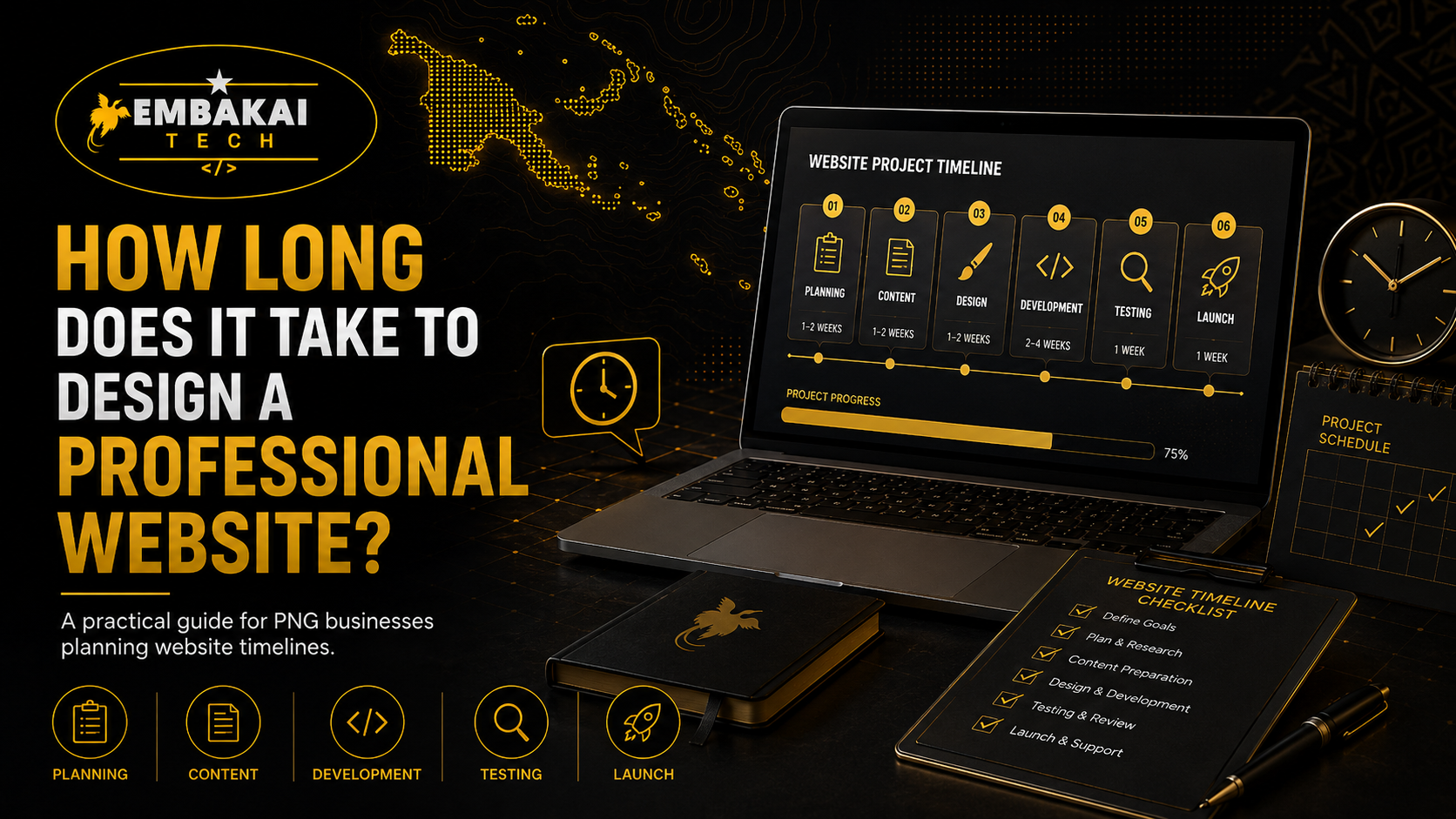
A professional website is normally completed in stages. Each stage matters because skipping steps can create problems later.
The usual stages include:
Let’s look at each stage in more detail.
The planning stage is where the project begins.
Before a developer starts building, they need to understand what the business needs. A website should not be created without a clear purpose.
During planning, the business and developer should discuss:
For example, a construction company may need services, projects, contact forms, WhatsApp integration, and quote requests.
An online shop may need products, payments, customer accounts, delivery settings, stock management, and order tracking.
A training provider may need course information, registration forms, downloadable documents, payment options, and certificate-related features.
The clearer the plan, the smoother the project will be.
Planning can take a short time for a simple website. For more complex projects, it may take longer because the developer needs to understand workflows, user roles, business rules, and technical requirements.
A rushed planning stage can lead to expensive changes later.
Content collection is one of the biggest reasons website projects get delayed.
A developer can create the structure and design, but the business must provide accurate information about the company.
Common website content includes:
Some businesses already have this content ready. Others need help writing or improving it.
If content is incomplete, unclear, or missing, the project may slow down.
For example, a developer cannot properly build a services page if the business has not explained what services it offers. They cannot complete a contact page if there is no confirmed phone number, email address, or location.
Before the project begins, prepare:
The faster content is prepared, the faster the website can move forward.
The design stage is where the website begins to take visual shape.
This is not just about choosing colours and fonts. Good website design considers how visitors will move through the website and what information they need to see first.
A professional design should include:
The design must help visitors understand the business quickly.
For example, when a visitor lands on the homepage, they should be able to see:
A website that looks good but confuses users is not a strong website.
Most professional website projects include design reviews and revisions.
The client may request changes to:
Small revisions are normal. However, major changes can affect the timeline.
For example:
Clear communication during the design stage helps avoid delays.
After the design direction is approved, the developer begins building the website.
This stage includes turning the approved layout into a working website.
Depending on the project, development may include:
A basic business website will usually require less development than a custom website or e-commerce store.
A basic business website may include:
An advanced website may include:
The more advanced the functions, the longer the development stage will take.
A website must work properly on phones, tablets, laptops, and desktop computers.
For businesses in Papua New Guinea, mobile design is especially important because many customers browse using mobile phones.
Mobile optimisation includes:
A website can look perfect on a laptop but still look bad on a phone if it is not tested properly.
Professional developers should check the website on different screen sizes before launch.
SEO should be included during website development, not treated as an afterthought.
SEO helps search engines understand what the website is about.
A basic SEO setup may include:
For PNG businesses, local SEO is important.
Your website should clearly show:
For example, a business serving Port Moresby, Lae, Mt Hagen, Goroka, Kokopo, Madang, or all of Papua New Guinea should make that clear in its website content.
SEO setup takes time because each page needs to be structured properly.
Testing is one of the most important stages of website development.
A website should not be launched without checking that everything works.
Before launch, the developer should test:
For e-commerce websites, testing is especially important.
The developer should test:
A website may look complete, but testing helps identify hidden issues before customers see them.
Before launch, the client should review the website carefully.
The business owner should check:
This stage is important because the client understands the business information better than anyone else.
The developer may build the website, but the business owner must confirm that the content is accurate.
Delays can happen when feedback is not provided quickly. If the developer sends a preview and waits several days or weeks for approval, the launch will naturally take longer.
Fast and clear feedback helps keep the project on track.
Once testing and final approval are complete, the website can be launched.
Website launch may include:
A professional website launch is not simply clicking “publish.” It includes technical setup to make sure the website is secure, accessible, and ready for users.
Every project is different, but here is a simple guide.
A simple business website may include:
This type of project can move quickly when content is ready and feedback is provided on time.
A professional SME website may include:
This may take longer because it requires more content, more design work, and more testing.
An e-commerce website may include:
This takes longer because every feature must be tested properly.
A custom system may include:
This type of project takes the most time because it is built around specific business processes.
Website delays are common, but many can be avoided.
The most common causes of delay include:
The biggest cause is usually not the development itself. It is unclear planning and delayed content.
Businesses can help speed up the process by preparing before development starts.
Here is a practical checklist:
The more prepared you are, the faster the developer can build the website.
Many businesses want a website immediately. That is understandable, especially when launching a new service, starting a business, promoting an event, or preparing for a campaign.
But rushing can create problems.
A rushed website may have:
It is better to launch a smaller but properly built website than a large website with poor quality.
For example, starting with a strong five-page website is often better than trying to launch a twenty-page website without proper content or planning.
So, how long does it take to design a professional website?
The answer depends on the website type, features, content, design quality, feedback process, and technical requirements.
A simple business website can move quickly when everything is prepared. A professional company website, e-commerce store, or custom web system takes longer because it requires more planning, development, testing, and review.
The best website projects are not rushed. They are planned properly.
A good website should be:
Your website is a long-term business asset. Taking the time to build it properly can save money, reduce problems, and create a better experience for your customers.
Need a professional website for your business in Papua New Guinea?
Embakai Tech Solutions helps SMEs, organisations, startups, and entrepreneurs plan, design, build, launch, and maintain modern websites.
Whether you need a simple business website, e-commerce store, booking system, customer portal, or custom web application, we can help you build a practical solution based on your business goals.
Contact Embakai Tech Solutions today and start building a website that works for your business.
Contact Embakai Tech Solutions for a focused review, implementation plan or quote for your organisation in Papua New Guinea.