Cloudflare WAF helps protect websites from malicious requests. Use Security Events to identify the rule behind a block, test changes against real customer workflows, and scope exceptions to the affected request. This guide covers managed rules, rate limiting, contact forms and verified crawlers.
Cloudflare WAF is a security service that examines HTTP and HTTPS requests reaching a website through Cloudflare.
It can identify requests matching known attack patterns or custom security conditions and apply actions such as blocking, challenging or logging them.
When a domain is configured to use Cloudflare's reverse proxy, a simplified request flow looks like this:
Website Visitor
      |
      v
Cloudflare Network
      |
      v
WAF and Security Controls
      |
      +---- Malicious request: Block
      |
      +---- Suspicious request: Challenge
      |
      +---- Accepted request: Continue
                                |
                                v
                         Hosting Server
                                |
                                v
                         Website Application
The website application might use WordPress, Laravel, PHP or another supported technology.
Cloudflare evaluates incoming requests according to the enabled security products and their execution order.
Depending on the available rules and configuration, a WAF can help reduce risks associated with:
A WAF does not replace secure application development.
Your website still requires appropriate:
Consider a hypothetical engineering company operating in Port Moresby and Madang.
Its corporate website contains service descriptions, project information, a quotation form and a customer portal.
Different visitors use the website for different purposes.
A potential customer reads the services page.
An existing customer downloads an authorised document.
An employee signs into the dashboard.
A search engine crawler indexes public content.
A malicious bot sends repeated login requests.
A security configuration needs to distinguish between these activities.
Blocking all automated traffic may stop unwanted requests, but it can also interfere with legitimate indexing, monitoring or integrations.
Blocking every visitor from outside Papua New Guinea could prevent overseas suppliers, clients and business partners from reaching the company.
Applying challenges to every form submission may break an application that submits data through JavaScript.
Effective protection depends on identifying the actual risk and applying the appropriate control.
The aim should be measured security, not the largest possible number of blocked requests.
Cloudflare provides several protection mechanisms.
They work differently, and their availability depends on the account's subscription.
Managed rulesets contain security rules maintained by Cloudflare.
They detect recognised exploit patterns and other suspicious requests.
Cloudflare updates these rulesets as threats and detection techniques change.
Custom rules allow a website administrator to define conditions based on request characteristics.
For example, a business might apply a specific action to suspicious requests targeting a sensitive administration path.
The rule should match the appropriate hostname, URL path, method and other relevant conditions.
Rate limiting helps control how frequently requests matching defined conditions can occur.
It is particularly useful for login, password-reset and certain API endpoints.
Bot-related services identify automated activity using the capabilities available to the account.
These can help distinguish known legitimate automated services from suspicious traffic.
Cloudflare Security Events provides information about requests evaluated by relevant security products.
It is one of the most useful places to begin investigating unexpected blocks.
Turnstile can help protect application forms against automated abuse.
It uses a browser-side component and mandatory server-side token validation.
Turnstile is not a replacement for the entire WAF, and the WAF is not a replacement for proper Turnstile validation.
Not every Cloudflare subscription includes the same rulesets and controls.
This distinction matters when planning protection for a small business.
| Capability | Availability considerations |
|---|---|
| Cloudflare Free Managed Ruleset | Available on all plans |
| Cloudflare Managed Ruleset | Available on paid plans starting with Pro |
| Cloudflare OWASP Core Ruleset | Available on paid plans starting with Pro |
| Custom WAF rules | Available subject to plan limits and supported actions |
| Rate limiting | Available with plan-dependent limits and parameters |
| Bot Fight Mode | Available on Free plans, with limited customisation |
| Super Bot Fight Mode | Available on eligible paid plans |
| Advanced Bot Management | Requires eligible Enterprise capabilities |
The exact rule limits, configuration options and advanced fields should be checked against the current Cloudflare subscription.
Not necessarily.
A conventional corporate website may be adequately served by appropriate Free-plan protection, secure application code and suitable hosting.
A business operating a complex customer portal or public application may benefit from additional WAF controls, logging and configuration flexibility.
The decision should consider the website's actual risk, traffic patterns and operating requirements.
Do not purchase security features simply because they have impressive names.
Managed rules provide a practical foundation for detecting common web application attacks.
Where available, Cloudflare's Managed Ruleset contains rules that Cloudflare maintains and updates.
This reduces the need for the website administrator to write every detection rule manually.
A developer may not know every emerging exploit pattern affecting a particular application stack.
Managed rules can provide protection against recognised request patterns, including some newly discovered vulnerabilities.
However, these rules can still produce false positives.
No.
Cloudflare specifically advises against enabling all available rules indiscriminately.
Some rules are disabled by default to balance protection against possible disruption to legitimate traffic.
For example, rules associated with a particular application stack may be relevant only when that technology is actually in use.
A WordPress website and a custom Laravel application may need different considerations.
Cloudflare also offers an OWASP Core Ruleset on eligible plans.
It uses a scoring approach to evaluate suspicious request patterns.
However, Cloudflare warns that enabling this ruleset alongside other protections can introduce additional false positives, sometimes with limited extra benefit.
Do not assume that adding more rulesets always improves protection.
Recommended approach: Begin with relevant supported managed protection, inspect real traffic and tune confirmed problems before expanding enforcement.
A false positive occurs when a legitimate request is incorrectly identified as malicious.
For business websites, false positives can cause serious usability problems.
A customer submits a project description containing technical language, URLs or other structured information.
A security rule incorrectly identifies part of the submission as suspicious.
The customer receives a 403 error.
The business never receives the enquiry.
An authorised employee uploads a document or updates a page.
The request is blocked because it matches a managed rule.
The dashboard becomes unreliable.
A customer signs in and attempts to download an authorised invoice.
An overly broad custom rule challenges or blocks the request.
The customer cannot complete the intended task.
A rule challenges or blocks a legitimate search crawler.
The crawler may fail to retrieve content that the business wants indexed.
These examples show why successful security configuration must include functional testing.
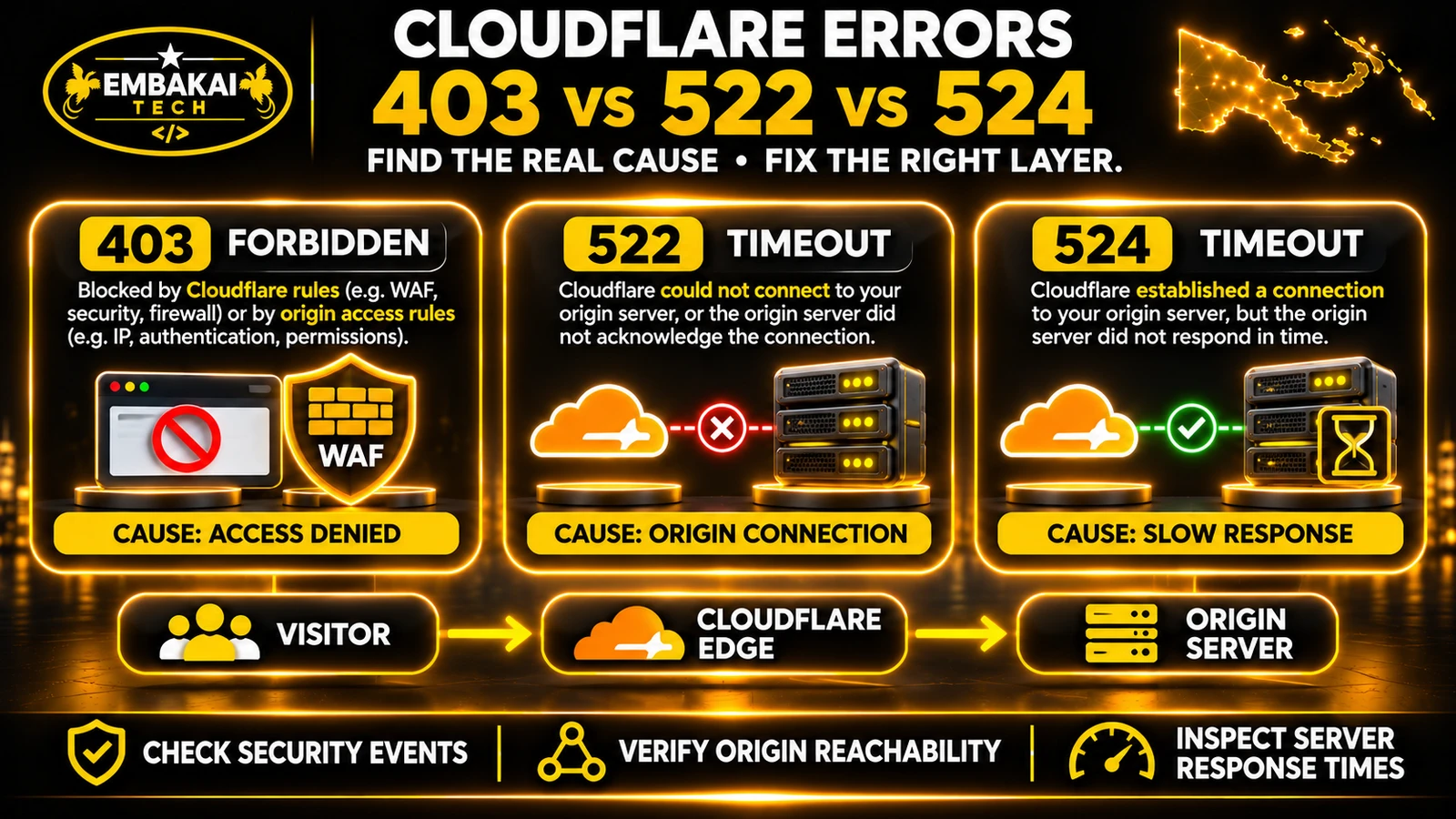
A 403 response can also originate from:
When customers report blocked requests, Cloudflare Security Events should be one of the first diagnostic tools you examine.
Depending on the dashboard version and plan, access the relevant Security Analytics and Events interface.
Record:
Affected URL: /contact/
Request: POST
Observed result: HTTP 403
Cloudflare action: Block
Matched rule: Identified from event record
Business impact: Customer quotation not submitted
This is an illustrative incident record.
Find the event corresponding to the failed request.
Identify which security product applied the action.
Review the rule's purpose and matching conditions.
Then determine whether the request should have been allowed.
Depending on the available features, it may be possible to create a narrowly scoped exception or adjust the specific managed rule.
Correct the expression or selected action.
For example, a rule intended to protect an administration endpoint should not accidentally cover the public contact form.
The available correction options differ.
Cloudflare's Free-plan Bot Fight Mode does not support ordinary WAF skip-rule exceptions.
It may require changing the feature's overall configuration or moving to a supported product with more granular controls.
This is why understanding the exact security product matters.
Cloudflare supports actions such as Block, Managed Challenge, Skip and Log, depending on the rule and available plan.
These actions have different operational consequences.
A blocked request is denied.
This can be appropriate when the request is clearly unwanted and the rule has been validated.
However, blocking should not be the automatic action for every uncertain request.
A Managed Challenge allows Cloudflare to evaluate whether a visitor can satisfy the required challenge.
This can be useful for some suspicious browser traffic.
However, it is not appropriate for every endpoint.
A browser may handle a challenge differently from:
Where available, logging a matching request without enforcement can help evaluate proposed rules before applying stronger actions.
Skip rules can exempt narrowly identified traffic from selected subsequent security checks.
But a Skip action must be understood carefully.
Skipping every security product for a broad path or entire network could allow unwanted requests through.
Use the narrowest action and scope that address the confirmed problem.
Login endpoints are common targets for repeated automated requests.
A malicious actor may attempt large numbers of username and password combinations.
Rate limiting can reduce this activity.
A WordPress installation may expose login functionality through:
/wp-login.php
The website administrator can consider a rate-limiting rule for the relevant login requests.
The correct configuration depends on the site's actual authentication flow and whether it uses custom login paths or additional protection.
A Laravel application may use routes such as:
/login
Or a custom authentication endpoint.
The applicable rule should match the actual application.
When designing a rate-limiting rule, consider:
Do not choose a request threshold simply because a tutorial recommends it.
A company may have many employees accessing its website from one shared internet connection.
An overly strict per-IP rule can accidentally affect several legitimate users.
Similarly, customers using mobile networks may share public IP addresses through carrier-grade NAT.
Observe normal traffic and login behaviour before selecting limits.
Also note that rate limiting is not a substitute for secure authentication, appropriate account protections and application-level validation.
Contact forms are especially important for businesses that generate leads through their websites.
They are also attractive targets for spam bots.
A practical protection strategy should combine appropriate controls.
The application should validate required fields, data types, lengths and other business rules.
Where applicable, the backend should enforce the framework's intended CSRF protection.
Turnstile may be used to help identify automated submissions.
The browser-side widget generates a token.
The backend must validate that token using Cloudflare's Siteverify API.
Simply displaying a Turnstile widget is not sufficient.
A suitable rate limit may help control repeated submissions.
However, the threshold should account for legitimate business activity and the way visitors access the internet.
For important business forms, storing accepted submissions can provide a way to recover enquiries if email notification fails.
The developer should verify:
Search engine visibility is important for business websites.
If your company wants customers to discover its services through Google, Bing or other supported search platforms, its public pages need to be accessible to appropriate crawlers.
Cloudflare maintains classifications for verified bots and agents.
These can include search crawlers, monitoring services and other automated traffic.
A malicious client can claim to be Googlebot by sending a matching User-Agent string.
That does not prove the request came from Google.
Use verified identification mechanisms rather than broad exceptions based only on a browser or crawler name.
Not automatically.
The better approach is to ensure legitimate crawlers can access the public content they need without granting unnecessary access to sensitive application endpoints.
For example, a search crawler generally needs access to:
After modifying crawler-related controls:
Automated AI-related traffic now includes several distinct behaviours.
Cloudflare introduced updated controls in 2026 for AI traffic categories including:
Search: Crawling content for search and retrieval systems.
Agent: Automated activity performed on behalf of users.
Training: Crawling used to train or fine-tune AI models.
These categories should not automatically receive identical treatment.
A PNG business may want its public service information discoverable through AI-powered search.
That does not necessarily mean the business must permit every form of automated data collection or model training.
Likewise, blocking all AI-related traffic may unintentionally restrict discovery or useful user-directed agents.
Decide which traffic behaviours support the organisation's goals.
For an ordinary corporate website aiming for broad discoverability, permitting appropriately verified search crawling may be valuable.
Consider other categories separately, according to business requirements and content policies.
Do not assume that a crawler's presence or verified status alone guarantees inclusion in AI-generated answers.
Cloudflare's AI traffic settings and default policies have changed over time.
For an existing domain, inspect the actual account configuration instead of assuming a recently documented default is already active.
Also consider how those settings interact with robots.txt and other applicable crawling controls.
A business based in Papua New Guinea might consider blocking website traffic from other countries.
The reasoning is understandable: most customers are local.
But a broad geographic block can create avoidable problems.
PNG businesses may receive enquiries from:
Some legitimate users connect through VPNs or services that make their traffic appear to originate elsewhere.
Automated services may access the website from infrastructure outside PNG.
Attackers can also use networks and infrastructure in locations that the business has allowed.
Geographic restrictions should therefore be treated as a specific access-control decision, not a complete defence against malicious traffic.
For most public corporate websites, narrowly targeted security rules are preferable to broad countrywide blocking.
Some business websites connect to external systems.
Examples include:
A security challenge intended for human visitors may break an automated integration.
An approved payment provider sends a server-to-server notification to an application endpoint.
If Cloudflare presents a browser challenge, the provider may not be able to complete it.
The website may fail to record the payment status correctly.
Identify the actual integration endpoints.
Verify the provider's supported authentication methods.
Use appropriate request authentication, signature verification or other supported safeguards.
If a specific Cloudflare protection incorrectly blocks a legitimate integration, adjust only the necessary rule or security phase.
Do not broadly disable security for the entire API.
A valid webhook signature or authenticated API request should be verified by the application regardless of whether Cloudflare allows the connection.
Cloudflare security features are not all evaluated in the same way.
Different products operate at different stages of request processing.
For example, custom WAF rules, rate limiting and managed rules are evaluated in separate phases.
Some actions can prevent later rules from executing.
Suppose an administrator creates an early custom rule that blocks all requests matching a broad condition.
A more specific exception placed later may never be evaluated for those blocked requests.
Similarly, a Skip rule may bypass selected subsequent protections depending on its configured scope.
Before adding a rule:
That can make troubleshooting harder and produce unpredictable interactions.
A useful security configuration can be built in stages.
Identify:
Review:
Measure ordinary visitor and application behaviour.
Identify normal form submission rates, login patterns and important automated requests.
This helps distinguish unusual activity from legitimate usage.
Configure appropriate managed protection and specific controls for important endpoints.
Avoid adding broad exceptions or duplicate rules.
Use authorised test accounts and controlled requests.
Confirm that real customer and employee activities remain possible.
Verify that the configured rules handle known unwanted request patterns according to their purpose.
Do not perform uncontrolled attack simulation against production infrastructure.
Review security events, application errors and actual enquiry activity.
A configuration may appear successful immediately but create problems under different traffic conditions.
Record:
A practical business website should pass the following checks.
| Test scenario | Expected behaviour |
|---|---|
| Customer opens homepage | Page loads |
| Customer opens service page | Content displays correctly |
| Customer submits valid enquiry | Submission accepted |
| Customer submits invalid form | Appropriate validation error |
| Staff logs into dashboard | Authorised login succeeds |
| Unauthorised user accesses private route | Backend denies access |
| Verified search crawler requests public page | Allowed according to approved crawler policy |
| Suspicious repeated login attempts | Applicable protection activates |
| Approved webhook sends notification | Request follows the intended integration flow |
| Application uploads valid file | Upload works within approved limits |
| Known malicious request pattern | Relevant rule applies expected protection |
The results should be recorded as Pass, Fail, Blocked or Not Applicable.
A rule should not be considered correctly configured until the affected business functions have been tested.
This can increase false positives without providing meaningful additional protection.
A single blocked endpoint should be investigated and corrected specifically.
User-Agent values can be spoofed. Use appropriate bot verification instead.
Automated clients and webhooks may not support interactive challenges.
Legitimate business traffic may originate outside PNG.
Shared IP addresses and legitimate repeated requests can cause unexpected blocks.
The correct rule cannot be confidently identified by guessing.
The application must still validate requests and enforce user permissions.
Blocking legitimate public-page crawling can affect discoverability.
A successful dashboard save does not prove that a security rule works correctly.
Consider a hypothetical civil construction company with offices in Port Moresby and Lae.
Its website receives quotation requests through a multi-step form.
The company has enabled Cloudflare protection to reduce malicious automated submissions.
After a configuration change, some customers report that the form displays a 403 error.
The developer submits a controlled test enquiry using valid information.
The same error occurs.
The browser confirms that the failure occurs on the form submission endpoint.
The developer identifies a specific WAF rule matching the legitimate request.
The rule is intended to detect suspicious requests but has an overly broad matching condition.
The developer narrows the rule or applies an appropriately scoped exception to the confirmed false positive.
Other relevant security protections remain active.
The developer verifies that:
The team reviews new security events and enquiry activity.
The problem is considered resolved only after the legitimate business workflow works consistently.
The correct fix was not to disable all Cloudflare protection.
It was to identify and correct the rule causing the false positive.
This is the difference between temporary troubleshooting and sustainable security configuration.
Before declaring your WAF configuration complete, verify the following:
However, it helps ensure that the business's security configuration is deliberate, maintainable and compatible with its normal operations.
Cloudflare WAF examines incoming web requests and applies configured security actions to help protect websites and web applications against malicious traffic.
Cloudflare provides a Free Managed Ruleset and selected WAF capabilities on its Free plan. More advanced rulesets and configuration options depend on paid subscriptions.
A WAF or another security rule may incorrectly classify the request. Review the matching Security Event, identify the actual blocking product and correct the specific cause.
Not automatically. First determine whether Cloudflare caused the failure. If a rule is responsible, apply a narrow correction and retest the form.
A configuration can interfere with legitimate crawlers if rules are too broad. Use verified bot classifications and test the actual public-page access requirements.
That depends on your business goals. If search discoverability is important, consider allowing appropriately verified Search traffic while evaluating Agent and Training behaviours separately.
Block denies a matching request. Managed Challenge attempts to distinguish acceptable browser traffic from unwanted activity through Cloudflare's challenge mechanism.
No. Turnstile is designed to help protect forms and similar workflows, while WAF applies network-edge application security rules. They have different functions.
Yes. Cloudflare can provide additional protection for a WordPress website, alongside WordPress updates, secure authentication, plugin maintenance and server-side controls.
Yes. It can help protect applicable HTTP requests, but Laravel must still enforce its own authentication, authorisation, validation and application security requirements.
Not necessarily. A high block count can include legitimate requests. Security effectiveness should be evaluated through actual threats, false positives and business functionality.
Cloudflare WAF can be an important part of protecting a business website.
But an effective configuration needs more than aggressive blocking.
It should recognise the difference between malicious activity, legitimate customer traffic, approved integrations and search crawlers.
For PNG businesses, this balance is particularly important when websites are used to receive quotation requests, communicate with clients, process online services and manage staff operations.
The practical approach is to start with an audit, understand the website's workflows, apply relevant protections and monitor the results.
When a problem occurs, identify the exact rule and correct the root cause rather than weakening the entire security configuration.
The best security setup is not the one that blocks the most traffic. It is the one that protects the application while allowing the business to operate reliably.
Embakai Tech Solutions provides website design and development services and custom software development for businesses and organisations across Papua New Guinea.
Whether your organisation operates a corporate website, WordPress installation, Laravel application or customer portal, website security should be planned around its actual functionality and hosting environment.
For related technical guidance, read Cloudflare SSL vs cPanel AutoSSL.
Contact Embakai Tech Solutions to discuss your website requirements or request a technical assessment.
Contact Embakai Tech Solutions for a focused review, implementation plan or quote for your organisation in Papua New Guinea.