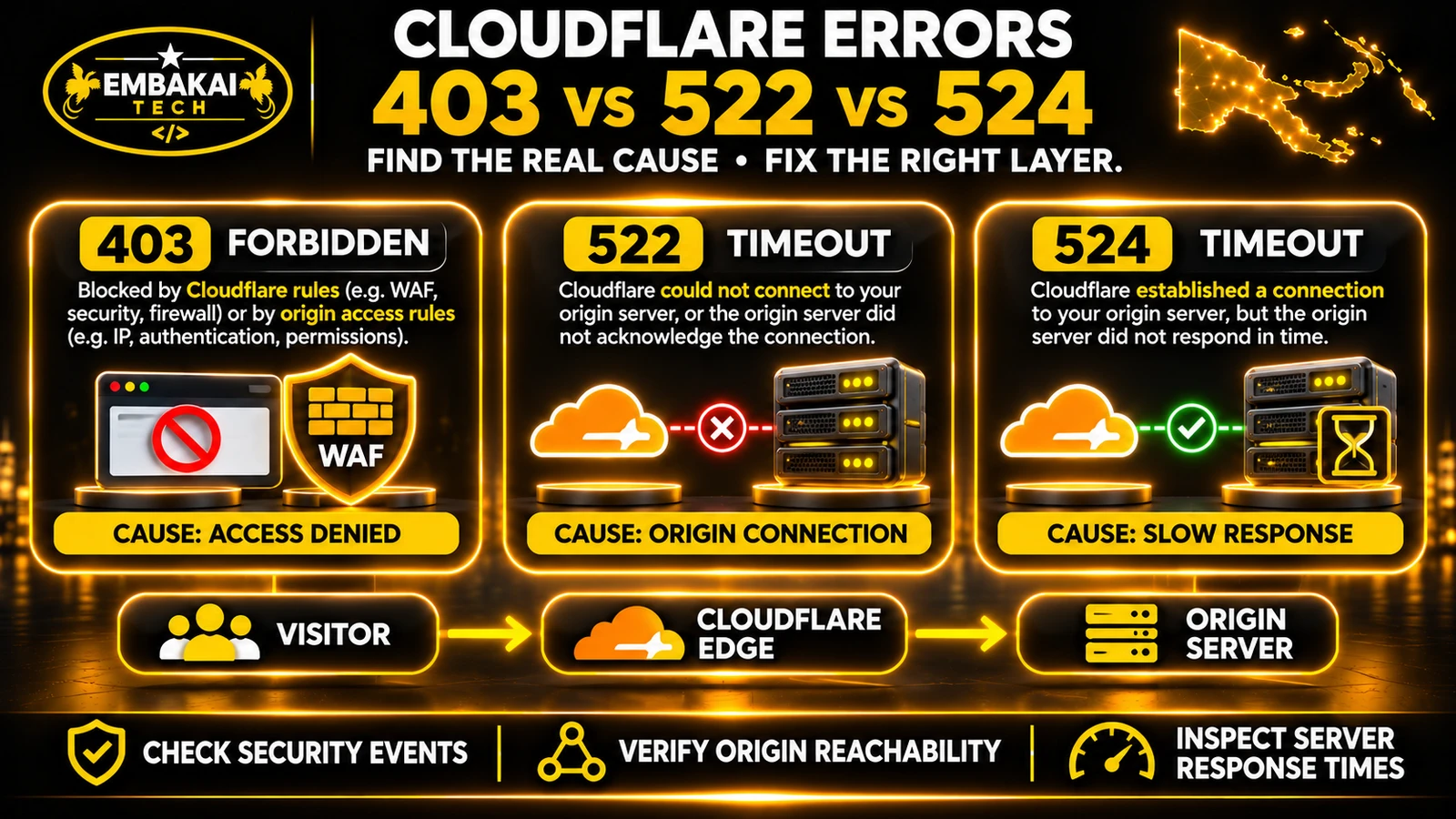
Cloudflare error 403 means a request was denied. A 522 points to a timeout communicating with the origin, and a 524 means Cloudflare connected to the origin but the request exceeded a proxy timeout. Start with the exact status, request URL and timestamp to decide which logs to check.
Cloudflare acts as a reverse proxy when a website's DNS record is configured to use its proxy service.
Instead of every visitor connecting directly to the hosting server, HTTP and HTTPS requests normally pass through Cloudflare.
The simplified flow is:
Website Visitor
      |
      v
Cloudflare Edge
      |
      | Security, caching and routing
      v
Origin Hosting Server
      |
      | Web server and application
      v
Website Response
The origin server might be running Apache, LiteSpeed, Nginx or another web server.
The application could be WordPress, Laravel or another website platform.
Cloudflare may inspect incoming requests, apply security controls, serve eligible cached content and forward other requests to the origin.
When something goes wrong, the error can occur at different points in this process.
That is why identifying the failing layer matters.
| Error | What it means | Where to investigate first |
|---|---|---|
| 403 Forbidden | The request was denied | Cloudflare security events, application permissions, origin access rules |
| 522 Connection Timed Out | Cloudflare timed out communicating with the origin during connection or request acknowledgement | Origin reachability, firewall, DNS, server availability |
| 524 A Timeout Occurred | Cloudflare connected to the origin, but the origin did not complete the expected response in time | Slow application processes, database queries, server resources |
A useful way to remember the difference:
403: Access was denied.
522: Cloudflare could not complete the required connection or request acknowledgement in time.
524: Cloudflare connected, but the server took too long to respond.
The status code identifies the general failure condition. It does not, by itself, identify the exact underlying cause.
A 403 response means the server or an intermediary understood the request but refused to fulfil it.
When a website uses Cloudflare, a 403 can come from either Cloudflare or the origin application.
This is an important distinction.
Cloudflare may deny requests through security controls such as:
If a legitimate customer matches that rule, the customer may receive a 403 response even though the website's origin server is functioning normally.
The hosting server or application can also produce a 403.
Possible causes include:
That is expected behaviour, not necessarily a website defect.
Similarly, an origin firewall may incorrectly deny connections associated with Cloudflare.
Start with the response itself.
Cloudflare-branded error pages may provide evidence that an edge security mechanism denied the request.
An origin-generated 403 may show the hosting server's or application's own error page.
However, custom error pages and unstyled Cloudflare responses can complicate the distinction.
Do not rely entirely on how the page looks.
Check the response headers, Cloudflare security events and relevant origin logs.
Cloudflare-generated error pages may include diagnostic headers such as cf-error-type and cf-error-origin.
The presence of a cf-ray header alone does not prove that a Cloudflare WAF rule caused the 403. Proxied origin responses may also carry Cloudflare headers.
Consider a hypothetical construction company in Port Moresby.
Its website loads normally, but the quotation form returns 403 after the customer clicks Submit.
Possible explanations include:
The developer should inspect the browser request, Cloudflare events and application response before changing anything.
If a legitimate request is being blocked, correct the narrowest appropriate rule or validation issue while preserving the rest of the website's protections.
Cloudflare error 522 indicates a timeout while communicating with the origin server during connection establishment or request acknowledgement.
In simple terms, Cloudflare cannot complete the expected communication with the hosting server within the allowed time.
Cloudflare documents two relevant timeout conditions:
The hosting server may be offline, restarting or otherwise unable to accept the required connection.
CPU, memory, process or connection pressure may prevent timely responses.
An origin firewall, hosting rule or rate limiter may deny or drop traffic from Cloudflare's infrastructure.
The origin IP address configured in Cloudflare may no longer match the correct hosting server.
Routing problems, dropped packets or other network issues can prevent the required communication.
Connection and keepalive behaviour may contribute to problems in some environments.
Imagine a company in Lae moving its website to a new hosting account.
The developer transfers the application successfully but forgets to update the origin address configured in Cloudflare.
Visitors continue to use the domain, but Cloudflare attempts to connect to the previous origin.
Depending on the old server's state, the result may be a 522 or another connection-related error.
The proper investigation begins with the actual origin configuration.
Changing random Cloudflare WAF rules would not address the incorrect destination.
First, verify that the origin server is operating.
Check the hosting provider's service status, web-server status and relevant logs.
Next, confirm the correct origin IP address or hostname is configured.
If Cloudflare proxies the domain, a public DNS lookup may return Cloudflare IP addresses rather than the origin address. Inspect the configured origin through the authorised account.
Then investigate whether the origin firewall accepts legitimate Cloudflare connections.
If the hosting provider restricts incoming web traffic, it must permit the Cloudflare connections required by the site's architecture.
Finally, review available origin connection metrics and resource usage.
If the site uses shared hosting, resource limits or provider-side connection restrictions may require the hosting company's assistance.
If a website is designed to accept public traffic only through Cloudflare, fixing a 522 should not involve permanently exposing the origin IP to unrestricted internet traffic.
Use authorised diagnostics and an appropriate origin firewall configuration.
Allow the necessary Cloudflare-origin communication while preserving the intended access controls.
Cloudflare error 524 is different from 522.
With a 524, the connection to the origin has already been established successfully.
The problem is that the origin did not complete the required response before the applicable timeout.
As documented in 2026, Cloudflare's default Proxy Read Timeout is 125 seconds.
A 524 can also relate to an origin write operation not completing before the relevant Proxy Write Timeout, which is generally 30 seconds.
Consider a hypothetical company in Mount Hagen using a custom administration system.
Management clicks Generate Report.
The application retrieves a large amount of data, performs calculations and starts building a spreadsheet.
If the request takes longer than Cloudflare's read timeout without producing the expected response, the visitor may receive 524.
The origin may still be working on the operation.
This creates another risk: if the employee retries the action repeatedly, the system may start multiple expensive jobs.
For tasks that create records, such as orders or payments, careless retries can lead to duplicate operations unless appropriate protections are implemented.
Long-running work should often be moved away from an ordinary page request.
For example:
User requests report
         |
         v
Application validates request
         |
         v
Background job created
         |
         v
User receives job reference
         |
         v
Worker processes report
         |
         v
Application records result
         |
         v
User checks status or downloads file
This allows the initial request to complete quickly.
The application then handles the expensive work independently and provides progress or completion information.
For Laravel applications, an appropriate queue system can support this design.
However, the hosting environment must support the required worker processes. Should you increase the Cloudflare timeout? Not as the first response.
Cloudflare's ability to customise certain proxy timeouts depends on the plan and feature.
For example, Enterprise configurations may support a higher Proxy Read Timeout.
But increasing the timeout does not fix inefficient queries, blocked application workers or resource exhaustion.
For most business applications, investigate the underlying process first.
Also avoid moving a sensitive application endpoint to an unrestricted DNS-only hostname solely to bypass Cloudflare timeouts.
That can defeat the website's intended origin protection.
Imagine three visitors opening the same corporate website.
Visitor A receives 403.
The request was denied. The developer should investigate which security or application-access decision rejected it.
Visitor B receives 522.
Cloudflare did not complete the required communication with the origin in time. The developer should investigate the origin address, server availability, network path and connection restrictions.
Visitor C receives 524.
Cloudflare established the origin connection, but the server did not complete the response in time. The developer should examine slow application work, database performance and resource usage.
The mistakes happen when someone treats every error as a general Cloudflare problem and starts changing settings without identifying the failing layer.
Before changing website settings, collect enough information to reproduce the problem.
Record:
URL: https://www.example.com/contact/
Error: HTTP 403
Time: 2026-11-13 10:30 PNG time
Action: Submit quotation form
Ray ID: Recorded from response
Result: Homepage works; form submission fails
This example uses a fictional domain and an illustrative timestamp.
A useful incident report describes what failed and when, rather than simply saying “Cloudflare is broken.”
Modern browsers include tools for examining network requests.
In Firefox or Chrome:
For example, the website homepage may return HTTP 200 while the quotation API returns 403.
That tells you the problem is more specific than a sitewide outage.
Similarly, an export API may return 524 while ordinary public pages continue loading normally.
Do not assume the whole website has failed because one workflow is broken.
Windows users can run basic checks without installing additional diagnostic software.
Open PowerShell.
curl.exe -I https://www.example.com/
This sends a HEAD request.
Check the response status and available headers.
A HEAD request does not always behave exactly like a GET request, so use an actual GET when necessary.
curl.exe -sS -D - -o NUL https://www.example.com/contact/
This Windows example prints response headers while discarding the downloaded response body.
Review the status code and any available diagnostic headers.
Do not include private authentication tokens or sensitive customer information in diagnostic output shared publicly.
Resolve-DnsName example.com -Type A
Resolve-DnsName example.com -Type AAAA
If Cloudflare proxies the hostname, these queries generally show Cloudflare's public addresses.
They do not necessarily reveal the configured origin IP.
Use the authorised Cloudflare DNS configuration to verify the actual origin destination.
For an unauthenticated test page:
curl.exe -sS -o NUL -w "HTTP: %{http_code} Total: %{time_total}s`n" https://www.example.com/
This gives a basic measurement for one request.
It is not a full performance benchmark.
For meaningful diagnosis, compare results over time and examine server-side metrics.
When a 403 may be caused by Cloudflare, the appropriate next step is to inspect Security Events.
Use the authorised Cloudflare dashboard.
Look for an event matching the request's time, Ray ID, source characteristics and relevant URL.
Depending on the available features, an event may show:
Some requests may be handled at different stages, and available logging depends on the plan and product.
It is also possible that the origin generated the 403.
Correlate Cloudflare data with the origin's logs.
If a legitimate request matches an overly broad custom WAF rule, refine the actual condition.
For example, a rule blocking all form submissions with certain request characteristics may need a more specific expression.
Do not disable every managed rule or broadly trust all requests claiming to come from a familiar browser.
For legitimate search engine crawlers, use appropriate verification methods rather than trusting User-Agent strings alone.
The goal is to allow valid business traffic while continuing to block unwanted requests.
For a 522, focus on whether Cloudflare can reach the intended origin.
Useful evidence includes:
Origin address: Is Cloudflare targeting the correct server?
Web server: Is the required service running and listening?
Firewall: Are required Cloudflare connections being accepted?
Server load: Is the machine sufficiently responsive to establish connections?
Network path: Are packets reaching the origin?
Hosting restrictions: Are provider-side connection or resource limits involved?
Cloudflare Origin Analytics, where available, can help investigate TCP connection failures.
Hosting providers may also need to inspect firewall logs, web-server state and network-level information.
A business website may be hosted on a server where the account owner cannot access the underlying firewall or web-server configuration.
In that case, the developer should collect error details and ask the hosting provider to examine the actual connection failures.
Repeatedly changing application files is unlikely to fix a network-level connection problem.
For a 524, inspect what the origin is doing after the connection is established.
Important measurements include:
A WordPress administration action may run a large import or process many media files.
If it performs all work inside one HTTP request, the operation may exceed the proxy timeout.
Investigate whether the task can be broken into smaller operations or processed through an appropriate background mechanism.
A Laravel reporting route might perform expensive joins, retrieve unnecessary records or generate a large export.
Before increasing server resources, investigate query plans, indexes, pagination and the report-generation workflow.
A suitable design may queue the report, return a job identifier and let the user download the finished result later.
A user receiving 524 may assume the operation failed.
But the server may have completed all or part of the work before the response was lost.
For business-critical operations such as invoice creation or payment processing, use suitable request identifiers, transaction rules and idempotency protections.
A timeout should not accidentally produce duplicate invoices or charges.
Use this diagnostic table to narrow the investigation.
| Observation | More relevant investigation |
|---|---|
| Only one customer receives 403 | Security events, client conditions, applicable access rules |
| Every form submission receives 403 | Form validation, WAF, application permissions |
| All uncached pages return 522 | Origin connectivity, firewall, server availability |
| One hostname returns 522 | Origin configuration for that hostname |
| Only large report exports return 524 | Application execution time and background processing |
| Dashboard works until a complex filter is applied | Slow backend query or external dependency |
| Homepage works but backend API fails | API routing, authorisation or backend processing |
| Errors begin immediately after hosting migration | Origin addresses, server configuration, deployment changes |
These observations guide troubleshooting, but logs and reproducible tests are still needed to establish the cause.
Not automatically.
Cloudflare may provide important protections such as traffic filtering, DDoS mitigation, caching and control over origin exposure.
Disabling proxy protection or exposing the origin publicly can introduce problems unrelated to the original error.
For an organisation intentionally restricting website connections to Cloudflare, a temporary public bypass may conflict with its security architecture.
A better approach is to use authorised diagnostic methods, hosting-provider assistance and a controlled staging environment when needed.
Where origin-level testing is justified, perform it through an approved, restricted route.
Do not publish origin IP addresses or create permanent unrestricted access merely to make troubleshooting easier.
A troubleshooting method should not create a larger security problem than the error being investigated.
A website outage can be more than an inconvenience.
Consider several common business scenarios.
A legitimate visitor receives 403 when trying to submit an enquiry.
The firm may lose an opportunity to respond to a potential client.
The correct investigation should determine whether the request was denied by the application or a security rule.
Cloudflare returns 522 because the origin server is unreachable.
Customers cannot open product pages or complete orders.
The development team needs to investigate hosting availability and Cloudflare-origin connectivity.
An employee generates a large registration report and receives 524.
The application may need better query design or background report processing.
In each case, the business needs the appropriate technical response, not an indiscriminate change to Cloudflare settings.
These are hypothetical examples illustrating different failure conditions.
Use this checklist whenever a Cloudflare-related error appears.
It means the request was denied. The response may come from Cloudflare security controls or the origin web server. Check the actual response, security events and application logs to identify the source.
A 522 occurs when Cloudflare times out communicating with the origin at the connection or request-acknowledgement stage. Possible causes include an unavailable origin, blocked Cloudflare connections, incorrect origin configuration or network problems.
Cloudflare connected successfully to the origin, but the response did not arrive before the applicable timeout. Long-running application tasks, slow queries and resource exhaustion are common causes.
No. A 522 relates to a timeout establishing or acknowledging communication with the origin. A 524 occurs after Cloudflare has established the origin connection but cannot obtain the expected response in time.
Shared hosting resource limits and server problems can contribute to these errors. However, the exact cause must be verified. A 522 may involve connection restrictions, while a 524 commonly requires investigation of slow application processing.
Not necessarily. More resources may help when capacity is the confirmed limitation, but a VPS will not automatically correct a bad WAF rule, wrong origin address or inefficient application logic.
Yes. Applicable WAF and other security rules can block requests. The origin may also generate 403 independently, so identify which component denied the request.
Not as a routine fix. Investigate origin reachability, firewall restrictions and DNS configuration first. Avoid exposing a protected origin unnecessarily.
Yes. The origin may be operational but too slow to respond to a particular request. Some long-running processing may even continue after the visitor receives the timeout.
No. These errors do not, by themselves, prove a security breach. They indicate access denial or communication failures that require investigation.
Cloudflare 403, 522 and 524 errors should not be treated as interchangeable problems.
Each points to a different part of the request flow:
403: Investigate access-denial decisions.
522: Investigate origin connection and communication problems.
524: Investigate application processing and response time.
The most effective troubleshooting process begins with evidence: the HTTP response, Cloudflare Ray ID, security events, origin logs and actual application behaviour.
For PNG business websites that depend on enquiries, payments, customer portals or online services, correcting the root cause matters more than temporarily hiding the error.
A reliable website needs appropriate security controls, compatible hosting, efficient application code and a tested recovery process.
Embakai Tech Solutions provides website development and custom software development for businesses and organisations across Papua New Guinea.
If your corporate website, WordPress installation or custom Laravel application is experiencing repeated HTTP errors, start with a technical investigation of the actual failing component.
Contact Embakai Tech Solutions to discuss your website’s technical requirements. For incidents that begin after a host change, see our website migration guide.
Contact Embakai Tech Solutions for a focused review, implementation plan or quote for your organisation in Papua New Guinea.